
AI visibility for WordPress
When buyers ask AI who to choose, know whether your brand appears.
AMASO checks the questions your customers ask across ChatGPT, Perplexity, Gemini and Claude. See when your business is cited, who appears instead and what to improve inside WordPress.
- Trace visibility back to the exact query
- Compare your brand with competing domains
- Turn evidence into a repeatable workflow
Free forever · No credit card · First result in about 5 minutes
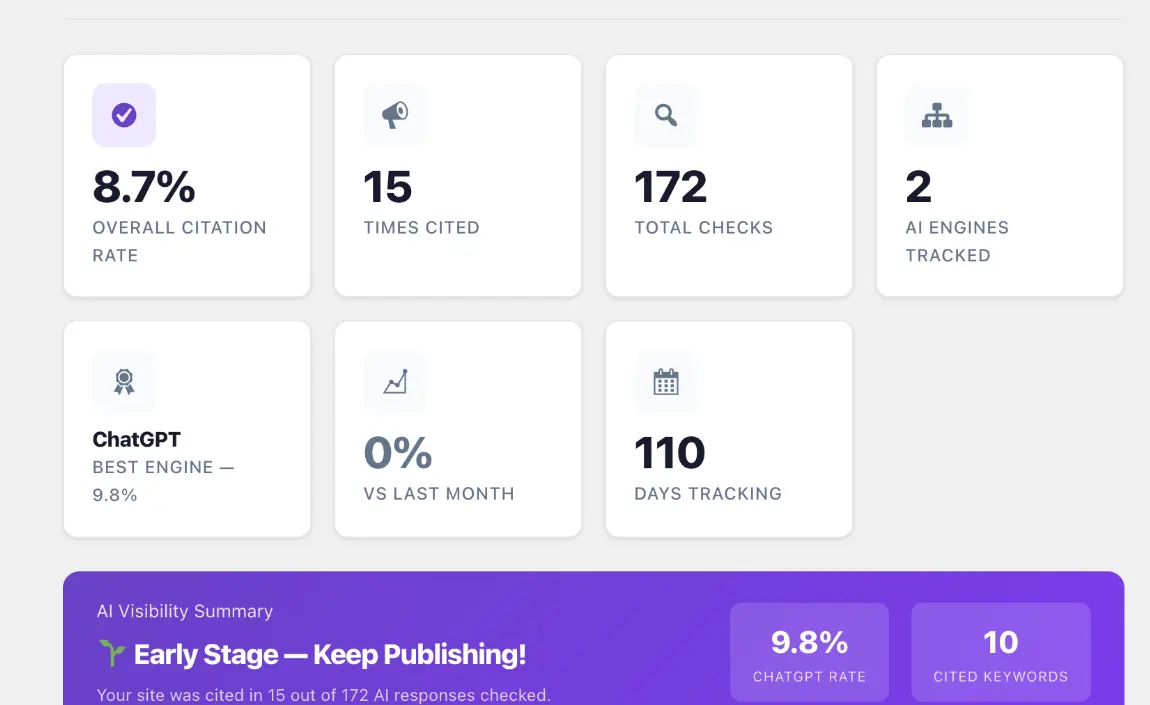
The visibility gap
Your analytics show visits. They may not show what AI recommends.
AI assistants are becoming a discovery layer of their own. AMASO gives you the evidence needed to see where your brand is present, missing or competing for attention.
Are AI engines citing your website?
Measure whether your business appears across the customer questions that matter to your market.
Which questions trigger a mention?
Move beyond a general percentage and inspect the query, engine and date behind each result.
Which competitors appear instead?
Identify competing domains and compare their visibility across the answers being checked.
Is your visibility changing over time?
Repeat the same checks and follow the pattern instead of relying on one isolated AI conversation.
How AMASO works
Turn uncertainty into a repeatable visibility workflow.
Set up the plugin, track real customer questions, inspect the evidence and decide what to improve all from WordPress.
Install
Add AMASO like a normal WordPress plugin and follow the guided setup in approximately two minutes.
Track
Add the questions potential customers ask about your market, services, products or buying decisions.
Check
Run citation checks across four supported AI engines and inspect the result behind each tracked query.
Improve
Review relevant WordPress improvements, approve proposed content and repeat the checks over time.
See the real product
From one percentage to the exact queries behind it.
Start with your citation rate. Then inspect the questions, AI engines, competing domains and dates behind every result without leaving WordPress.
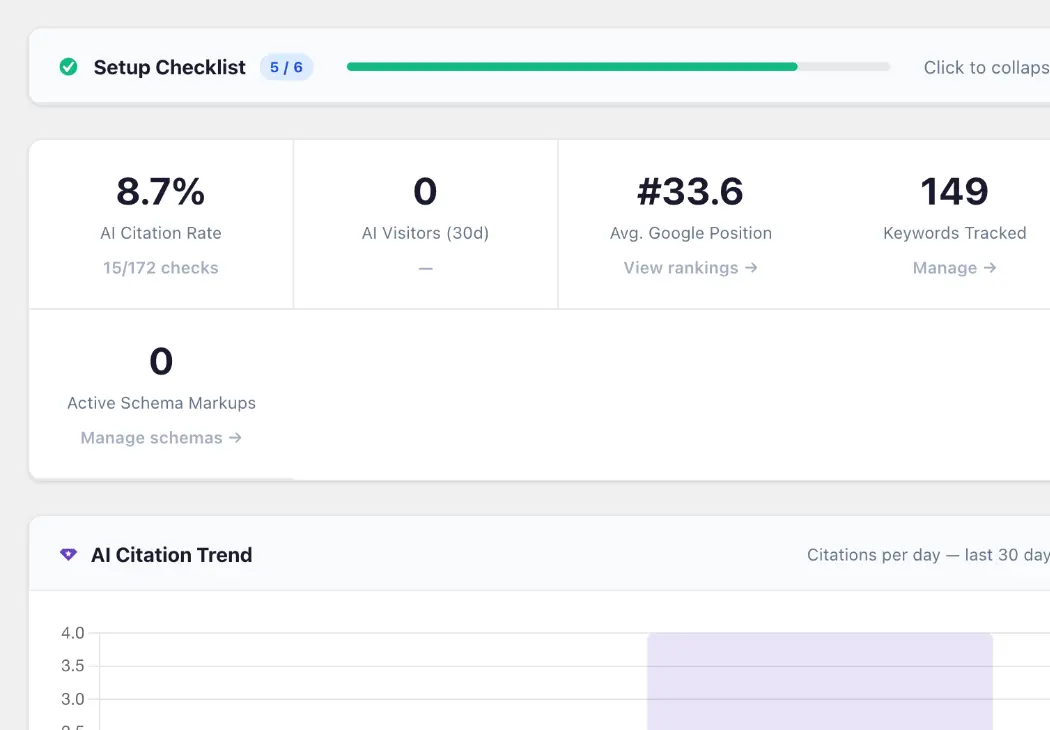
Your AI and search baseline at a glance.
Review citation rate, tracked queries, selected search indicators and visibility trends from one dashboard.
- AI citation rate
- Tracked keywords
- Visibility trends
- Search position context
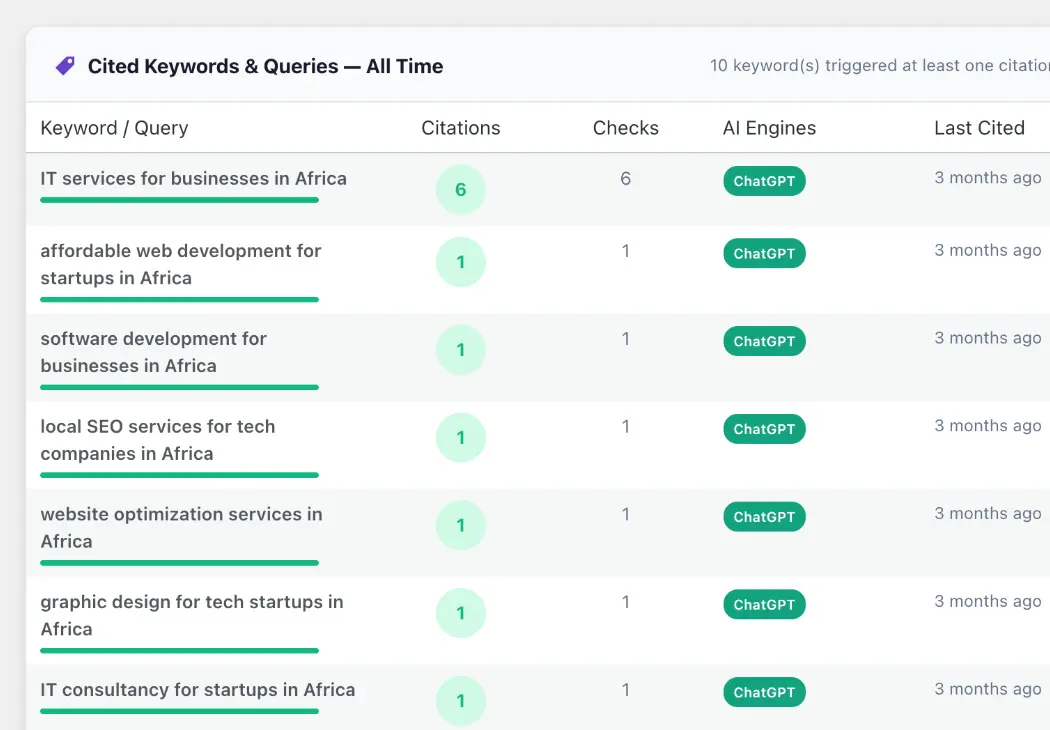
See which questions lead AI to cite you.
Review each tracked query, its citation count, the AI engine and when your business was last cited.
- Exact tracked query
- Citation count
- AI engine
- Last-cited date
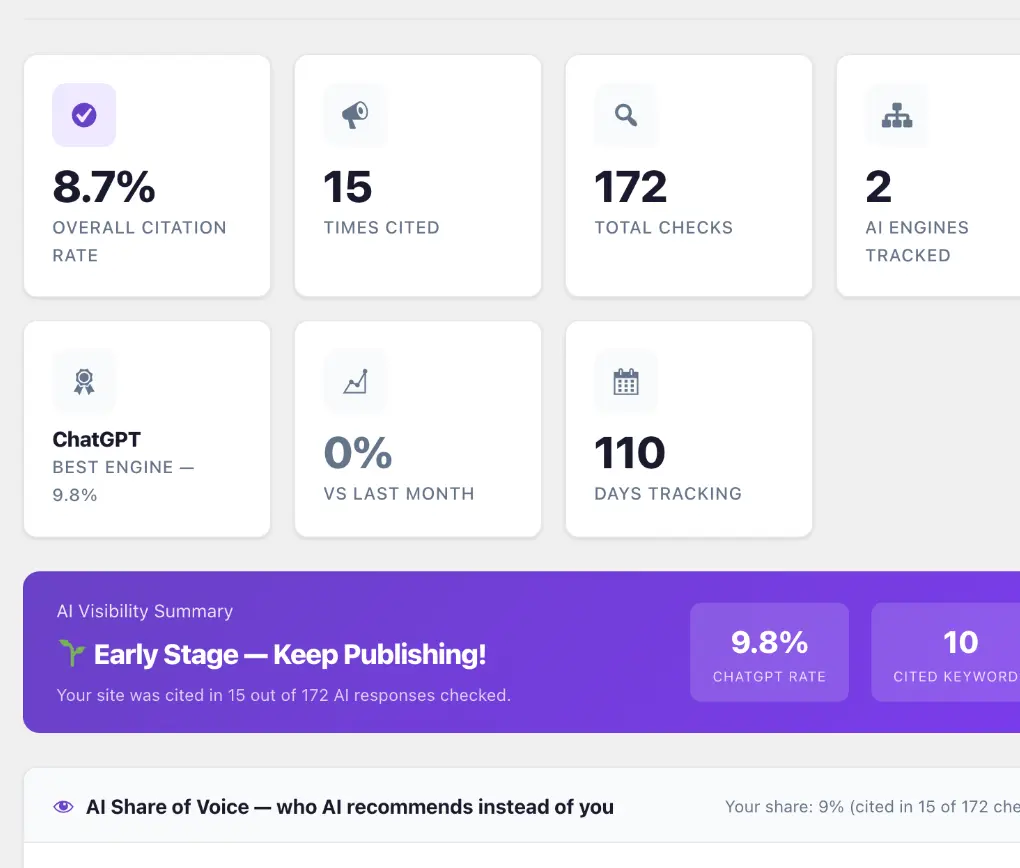
See which competitors appear across your checks.
Compare competing domains by mentions, engines and tracked queries to make the visibility gap concrete.
- Competing domains
- Recorded mentions
- AI engines
- Share of Voice
One evidence layer
See. Compare. Improve. Report.
AMASO brings the signals behind AI visibility into the same WordPress workflow where your website decisions already happen.
Track citations, not assumptions.
Run the customer questions that matter and see whether your business appears across supported AI engines.
Put competitors in view.
Use Share of Voice to see which domains appear across the questions you monitor.
Explore competitive visibility →Act inside WordPress.
Review supported website improvements without taking control away from your team.
Make the evidence shareable.
Turn dated checks and visibility patterns into clearer reports for your team or clients.
Your keys. Your approval. Your decision.
Keep provider usage and website content decisions under your control.
Repeatable, not anecdotal
A single AI chat is a snapshot. AMASO builds a monitoring workflow.
Manual checks can answer one question once. AMASO organizes the queries, engines, dates and competing domains so your team can inspect the pattern and revisit it it over time.
See how teams use AMASO →Built for the people responsible for discovery
One visibility layer. Three ways to put it to work.
Stop guessing whether AI recommends your brand.
See the visibility gaps, understand which domains appear instead and decide where your attention should go.
Explore the business workflow → 02 For SEO & GEO specialistsConnect what ranks with what AI cites.
Investigate query-level evidence and prioritize relevant content and technical improvements.
Explore the specialist workflow → 03 For agenciesMake AI visibility measurable for clients.
Replace vague readiness claims with dated checks, competitive evidence and clearer reporting.
Explore the agency workflow →Transparency & control
No black-box promise. See the checks behind the number.
AMASO measures returned answers and supports your WordPress workflow. AI providers still control what they generate, so visibility results can vary by query, website and engine.
AMASO provides measurable evidence not guaranteed rankings, citations or recommendations.
Start free
Establish your first AI visibility baseline before choosing a paid monitoring plan.
Use your own API keys
Keep AI provider usage, limits and related costs under your direct control.
Approve content changes
Review suggested AI-oriented FAQ content before it is published on your WordPress website.
Simple entry point
Start with a baseline. Scale when monitoring becomes recurring.
Four plans cover a first visibility check through to multi-site client work. AI provider usage is billed separately.
Establish your first AI visibility baseline with five tracked keywords.
Weekly monitoring for a business tracking up to 25 important keywords.
Daily checks for teams managing AI visibility as an ongoing channel.
Multi-site monitoring and reporting workflows for agencies and client teams.
Your own supported API keys keep provider usage and costs under your control.
Questions, answered
Before your first visibility check.
Clear answers about how AMASO works, what it measures and what remains under your control.
Explore the resource hub →What does “AI visibility” mean?
AI visibility describes whether your business appears in answers to relevant customer questions on AI assistants, and how that presence compares with competing domains.
Which AI engines does AMASO check?
AMASO supports citation checks across ChatGPT, Perplexity, Gemini and Claude.
Do I need technical skills to use AMASO?
No. AMASO installs as a WordPress plugin and provides a guided setup workflow for the first configuration and check.
Are AI provider API costs included?
No. You connect your own supported API keys. Usage follows the pricing, limits and terms of the relevant AI provider.
Does AMASO guarantee that AI will recommend my business?
No. AMASO measures returned answers and supports relevant WordPress improvements. AI providers control their outputs, so results can vary by query, website and engine.
Your first baseline
AI may already be shaping your next customer’s decision. See what it says about you.
Install AMASO, add the questions that matter and run your first AI visibility check directly from WordPress.
Free forever · No credit card · Results vary by website, query and AI engine